Configuration
The configuration consists of three parts:
-
G-CIS – General settings, managing of setup
-
Commend – General connection settings and camera texts
-
GeViSoft – Setup communication between COMMEND INTERNATIONAL and Geutebrück systems
G-CIS
G-CIS is started by executing G-CISEdit.exe or Start > Programs > GEUTEBRÜCK GmbH > GeViSoft > G-CIS Settings Editor.
The following figure shows the start screen of the G-CIS settings editor. It is possible to select the protocol COMWIN/ICX or SOFTVIDEO and to start and stop the G-CIS service.
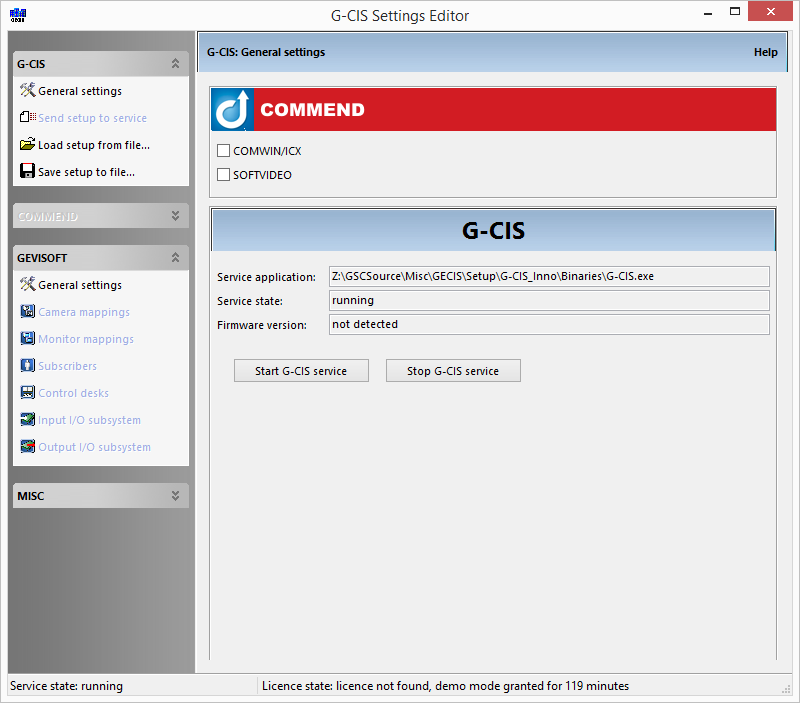
After changing the settings the setup has to be sent to the server. It is also possible to save or load a setup from a file:
Commend
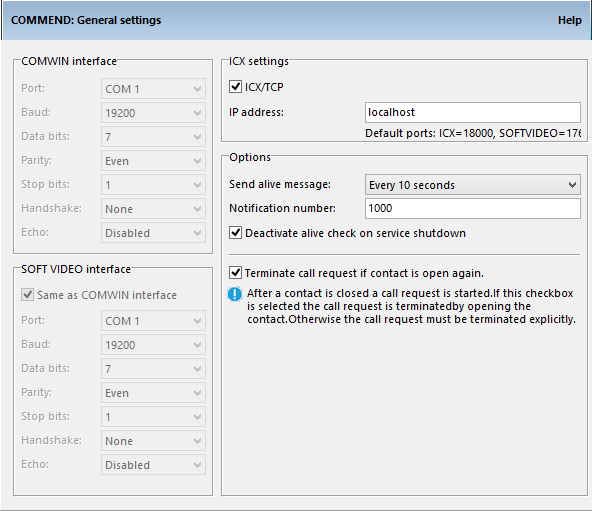
Basically the communication is based on two different protocols: COMWIN and SOFTVIDEO. It is possible to use one serial port for both protocols or a different serial port for each protocol.
In current systems ICX is used and the communication runs over TCP/IP. To use TCP/IP it is necessary to use the correct IP address and port.
Default ports:
-
ICX: 18000
-
SOFTVIDEO: 17600
The use of alive messages is optional: In a periodic interval alive messages are sent from G-CIS to the COMMEND system. If G-CIS no longer sends alive messages, COMMEND detects an error and calls the notification number. It is possible to disable the alive check if the G-CIS service is shut down.
If the option Terminate call request if contacts open again is enabled a call request is terminated by changing the state of the digital output. If not, the call request must be terminated explicitly.
GeViSoft
The general settings of GeViSoft are divided into two parts:
-
Interface settings - The hostname, username and password of the GeViSoft server
-
Options - Additional options of the protocol usage and PTZ cameras
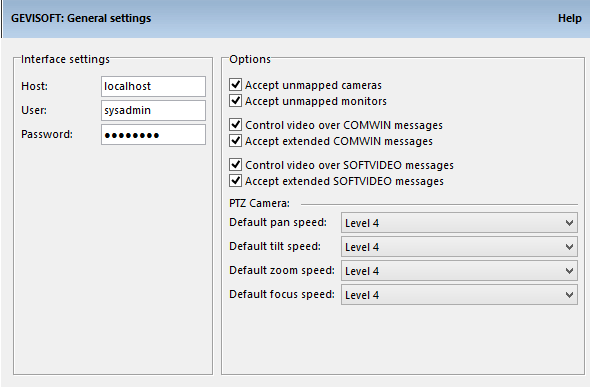
The following options are adjustable:
-
Accept unmapped cameras - Unmapped cameras are routed through G-CIS, the GeViSoft global number of the video input equals the COMMEND call number
-
Accept unmapped monitors - Unmapped monitors are routed through G-CIS, the GeViSoft global number of the video output equals the COMMEND call number
-
Control video over COMWIN messages
-
Accept extended COMWIN messages
-
Control video over SOFTVIDEO messages
-
Accept extended SOFTVIDEO messages
-
PTZ Camera - The default speed of pan, tilt, zoom and focus can be defined.
Camera Mappings
A lookup table maps the COMMEND cameras to the GeViSoft video inputs. It is possible to set a pre-set position to which the camera moves if the assigned COMMEND camera is called.
Monitor Mappings
A lookup table maps the COMMEND monitors to the GeViSoft video outputs.
Subscribers
A subscriber is a device that calls a control desk. Every subscriber has its own COMMEND call number. It is possible to assign multiple video inputs with different pre-set positions to each subscriber.
In case the subscriber calls a control desk the video inputs will be connected with the video outputs defined in the section “Control desks”.
Control desks
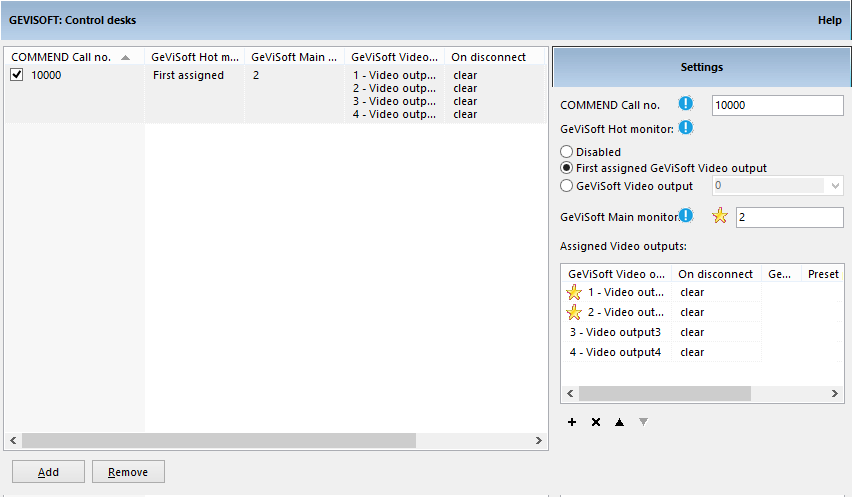
A control desk is a device which is called by a subscriber. The following options can be configured:
-
COMMEND call number
-
Hot Monitor - Is a video output. After connecting a video input to this video output a call to the mapped subscriber (identified by video input global number) is initiated. It is also possible to use a virtual video output.
-
Assigned Monitors - Are video outputs which can be connected with the video inputs from a subscriber.
Options of Assigned Monitors:
-
Video output - Assigned video output.
-
On Disconnect- Determines the behavior after hanging up a call.
-
Nothing – The connected video inputs are still connected.
-
Clear – The video outputs are cleared.
-
Last manual – If a video input is connected to this video output manually it will persist or else it will be cleared.
-
GeViSoft video input – A predefined video input is connected to the video output.
-
-
Video input and pre-set position - Can be configured if On Disconnect is set to “GeViSoft video input”.
Main- and preview monitors:
The number field GeViSoft Main monitors defines how many of the assigned monitors are main monitors. The main monitors in the assigned monitor list are marked with a star. The other monitors are preview monitors.
For further information read Advanced Subscriber and Control Desk Configuration.
COMMENDInput Settings
It is possible to connect digital inputs of the COMMEND INTERNATIONAL system to Geutebrück systems. Therefore the digital inputs of the COMMEND INTERNATIONAL system are configured in G-CIS. One COMMEND INTERNATIONAL digital input can be connected to multiple Geutebrück digital inputs/ outputs.
The following settings are possible:
-
COMMEND call number of the digital input
-
Behavior of the digital input
-
GeViSoft digital input/ output
-
Operation type, clear on, close level – same parameters as in COMMEND INTERNATIONAL setup
To signal the change of an in-/ output the commands OpenContact(<ContactNumber>) and CloseContact(<ContactNumber>) are used.
It is possible to use virtual GeViSoft digital input/outputs.
Behavior of the input:
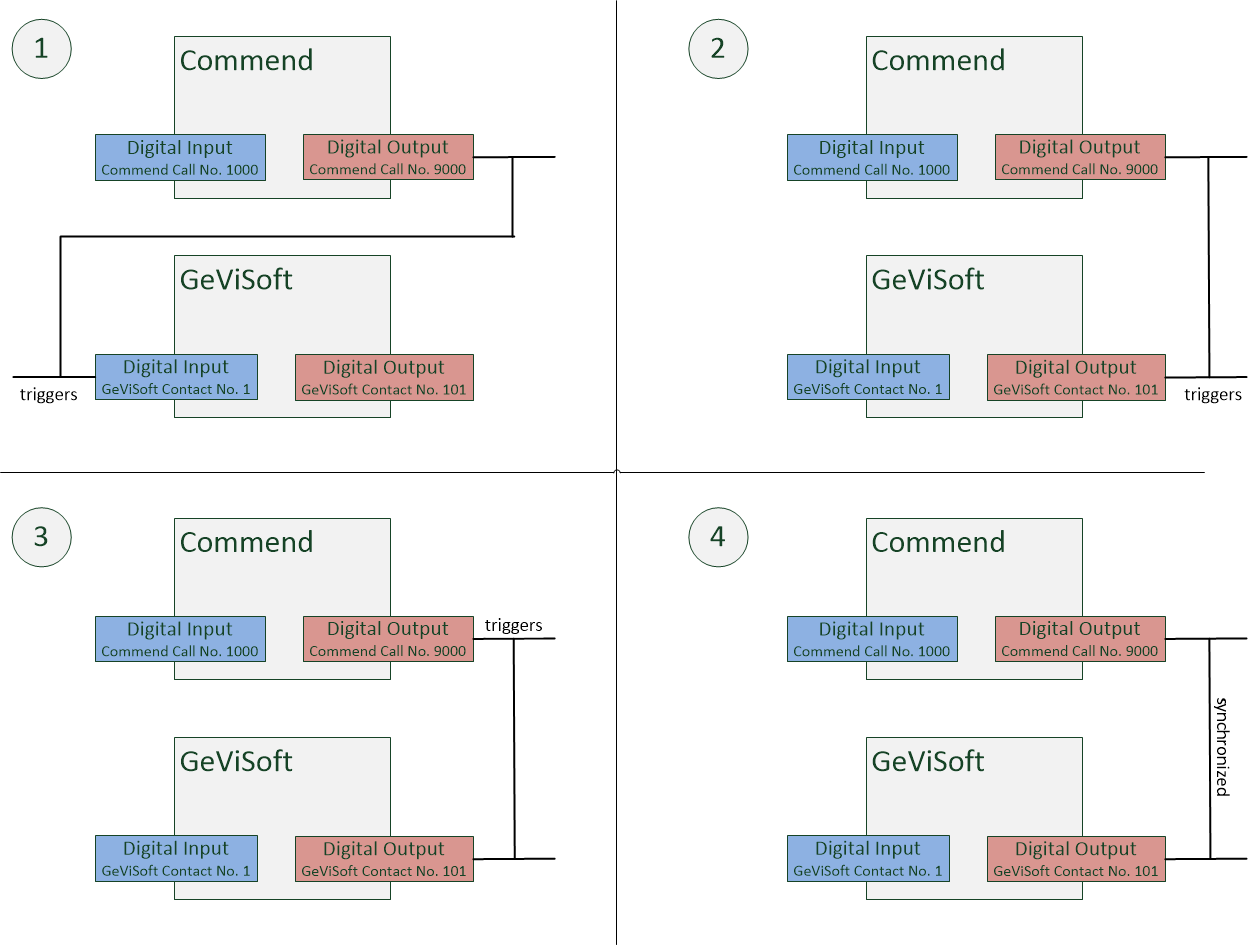
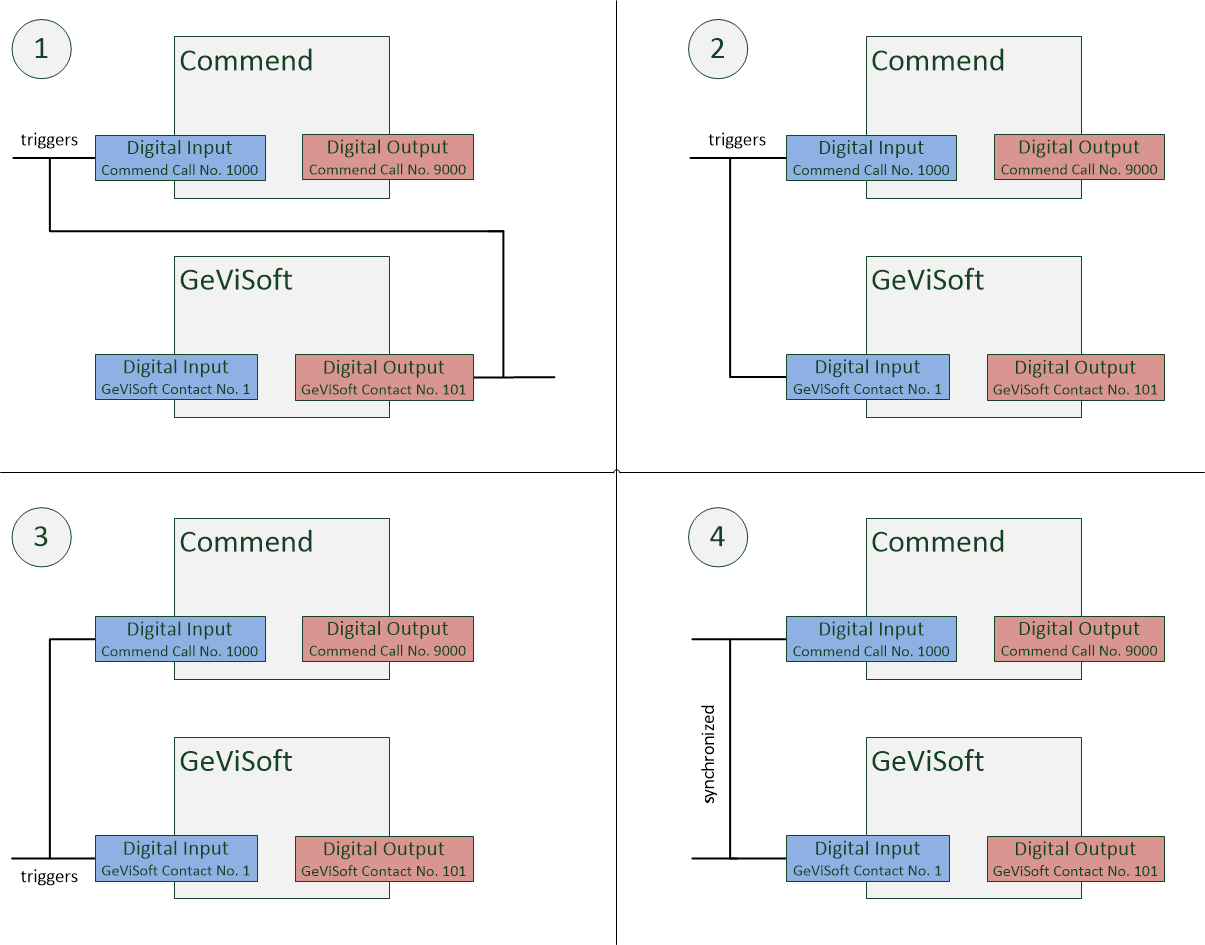
As shown in the following figure there are four different configurations possible:
-
COMMEND digital input triggers the digital output of GeViSoft
-
COMMEND digital input triggers the digital input of GeViSoft
-
GeViSoft digital input triggers COMMEND digital input
-
COMMEND and GeViSoft digital inputs are synchronized
COMMEND Output settings
It is possible to connect digital outputs of the COMMEND INTERNATIONAL system to Geutebrück systems. Therefore the digital outputs of the COMMEND INTERNATIONAL system are configured in G-CIS. One COMMEND INTERNATIONAL digital output can be connected to multiple Geutebrück digital in-/ outputs.
The following settings are possible:
-
COMMEND call number of the digital output
-
Behavior of the digital output
-
GeViSoft digital input/ output
-
Operation type, sabotage monitoring – same parameters as in COMMEND INTERNATIONAL setup
To signal the change of an input/ output the commands OpenContact(<ContactNumber>) and CloseContact(<ContactNumber>) are used.
It is possible to use virtual GeViSoft digital input/outputs.
Behavior of the output:
As shown in the following figure there are four different configurations possible:
-
GeViSoft digital input triggers COMMEND digital output
-
GeViSoft digital output triggers COMMEND digital output
-
COMMEND digital output triggers GeViSoft digital output
-
GeViSoft and COMMEND digital output are synchronized