

Geutebrück System Security
Our Commitment to Cyber Security
Geutebrück provides advanced video solutions for security and process optimization to a wide range of customers, including public authorities and critical industrial sectors. These clients have an exceptionally high demand for secure, durable, and reliable systems. Protecting these systems from unauthorized access, sabotage, manipulation, or espionage is of paramount importance.
In response to the rapidly evolving landscape of cyber threats, Geutebrück has implemented comprehensive measures to secure our products and solutions. Our approach to security is integrated into every stage of the product lifecycle, from development to deployment and ongoing maintenance. This document provides an overview of the security features, best practices, and services that ensure the integrity and resilience of a Geutebrück system.
Secure by Design: The Development Lifecycle
To achieve integrated and sustainable security, Geutebrück has embedded a Security Development Lifecycle (SDL) into our core development process. This proactive approach ensures that security is not an afterthought but a foundational component of our software.
Key elements of our SDL include:
- Defining Security Requirements: Establishing strict security criteria at the outset of any project.
- Threat Analysis: Proactively identifying and analyzing potential threats and vulnerabilities in system designs.
- Secure Coding Best Practices: Adhering to industry standards for writing secure and robust code.
- Static and Dynamic Code Analysis: Utilizing automated tools and manual processes (including penetration tests) to detect potential vulnerabilities in the code.
- Systematic Patch Management: Ensuring that all third-party components and operating systems are kept up-to-date with the latest security patches.
- Secure Development Environment: Protecting our development processes and tools with appropriate access controls and security measures.
Core Security Features
Geutebrück systems are equipped with multiple layers of security to protect data in transit and at rest:
Encrypted Communications
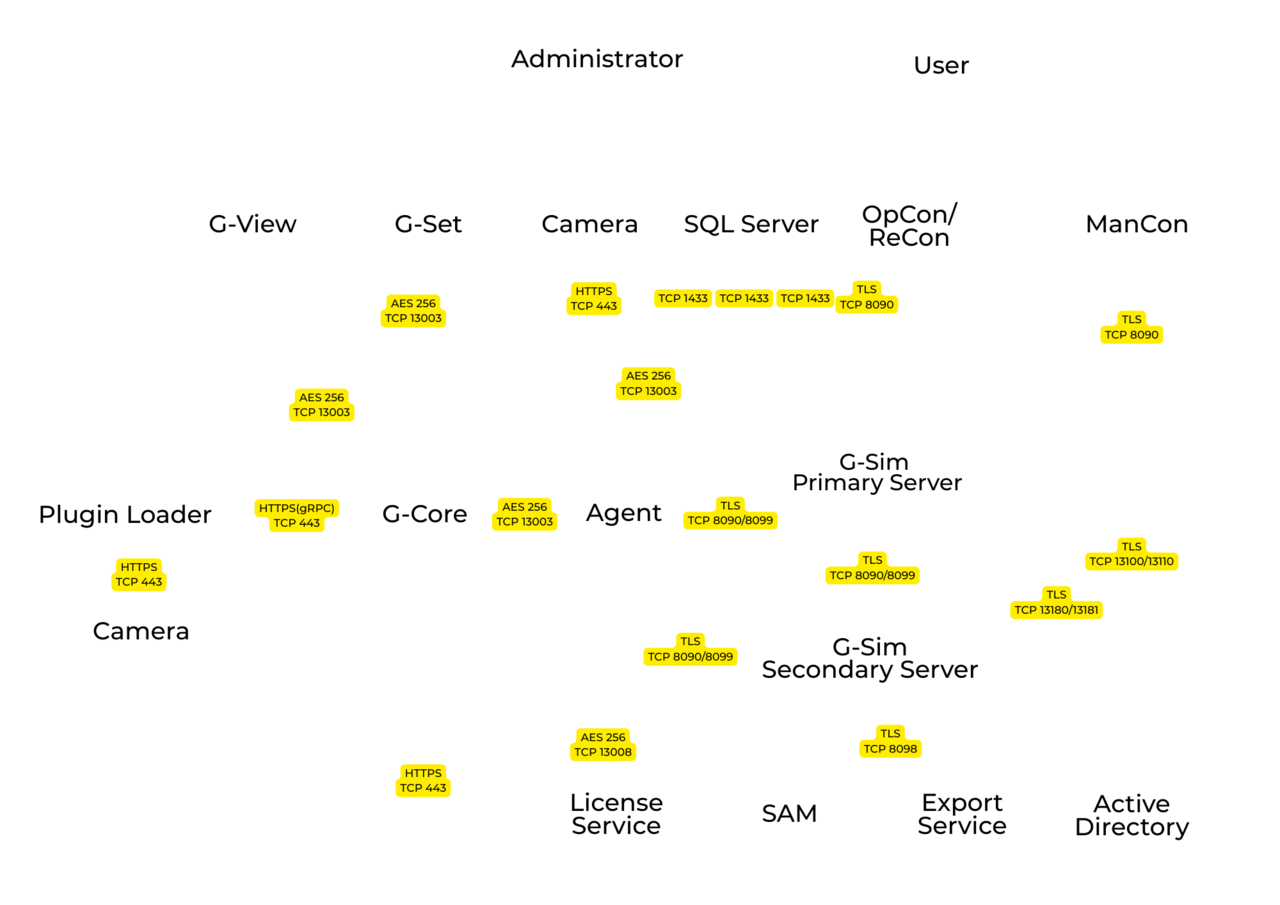
- Server & Client Communication: The communication between G-Core servers, the Software Asset Management Service (SAM), G-View Clients, and G-SIM (Agents and OpCon/ReCon Clients) is encrypted using the Advanced Encryption Standard (AES) with a 256-bit key size. The key exchange is managed by the secure Diffie-Hellman (DH) method.
- G-SIM to Client Communication: Communication between the G-SIM server and its clients is encrypted using Transport Layer Security (TLS), providing a secure HTTPS channel.
- Camera Communication: For Geutebrück and deeply integrated third-party cameras (e.g., Axis, Bosch), communication between the camera and the server can be encrypted using TLS (HTTPS). It is strongly recommended to use this feature where supported. RTSP over HTTPS is used.
- System Health Management: Our G-Health software also supports HTTPS with SSL certificates for secure communication.
Encrypted Databases and Storage
- Proprietary Video Database: Our video database utilizes a proprietary format. This design inherently protects against modification or data extraction without detailed knowledge of the Geutebrück database structure, as any unauthorized change results in data corruption.
- Full-Disk Encryption: For an additional layer of security for data at rest, we recommend using full-disk encryption tools like Microsoft BitLocker. BitLocker supports AES (128 and 256-bit) encryption and can secure the entire operating system volume, data volumes, or virtual drives.
Password Storage and Transmission
- G-Core Passwords: Passwords in G-Core are hashed using the Secure Hash Algorithm (SHA−256) with salting. The transmission of passwords is dual-encrypted: first using Blowfish (a symmetric-key block cipher) and second, using Windows standard password encryption with salting, which is bound to the specific Windows machine.
- G-SIM Passwords: G-SIM passwords are stored using the industry-standard PBKDF2 algorithm with salting, which provides strong protection against brute-force attacks.
Communication scheme of the system components
System Hardening Guide
"Hardening" refers to the process of securing a system by reducing its surface of vulnerability. While Geutebrück systems are delivered with key security measures in place, further hardening should be performed during commissioning based on specific site requirements.
Firmware & Software Updates
Always keep the firmware and software of all components (cameras, servers, clients, network switches) up to date. This ensures the system is protected by the latest available security patches. Regularly check the Geutebrück Portal for updates and the manufacturers' websites for third-party devices.
Physical Access Control
Physical access to servers, workstations, cameras, and network peripherals must be restricted to authorized personnel only. This prevents tampering, such as the unauthorized connection of USB devices, removal of hard drives, or disconnecting cables.
Network Configuration and Security
- Network Segmentation: The video surveillance network should be physically separated from the customer's main corporate network. If physical separation is not feasible, use VLANs to logically segment the network. A common best practice is to place cameras on a separate VLAN from viewing clients.
- Firewalls: Use a state-of-the-art, industry-proven firewall to protect the system from unauthorized access and to mitigate the risk of Denial of Service (DoS) or Distributed Denial of Service (DDoS) attacks, especially if the system is connected to other networks or the internet.
- Port Security and MAC Binding: On network switches, enable features like port-based authentication (IEEE 802.1X) or MAC address binding. This ensures that only authorized devices can connect to a switch port, preventing unauthorized network access.
- Wireless LAN (WLAN): Avoid using wireless LAN within the secure CCTV network wherever possible due to the increased security risks.
- Remote Access: Remote access to any part of the system should be managed via a secure Virtual Private Network (VPN) using modern encryption and authentication standards. Never expose a system directly to the internet without firewall protection. If port forwarding is absolutely necessary, only forward the minimal required ports and restrict access to authorized source IP addresses.
Device & Application Hardening
- Disable Unused Services: Deactivate all unused services on cameras and Windows servers to reduce the attack surface. This includes services like SSH, multicast, or QoS on cameras if they are not required, and services like SNMP on Windows if no monitoring system is in use.
- Change Default Ports: For devices like cameras, change the default administration and streaming ports to make them less susceptible to automated attacks.
- SQL Database Access: For any analysis or reporting on the SQL database, use an account with the minimum necessary read permissions. Do not use the sysadmin account for routine queries.
User and Access Management
- Change Default Passwords: Immediately change all default administrator passwords (Geutebrück system, cameras, switches) to strong, unique passwords that comply with modern complexity standards (e.g., OWASP password policy). Passwords should be changed regularly.
- Principle of Least Privilege: Configure user rights so that individuals only have access to the functions and data necessary for their role. Geutebrück's software allows for granular control over user permissions.
- Windows Service Accounts: Geutebrück services run by default as "LocalSystem". If a dedicated service account is used, ensure it has a strong password and only local user rights. A domain administrator account is not required and is strongly discouraged. For LDAP synchronization in G-SIM, the service account only requires read permissions on the Active Directory.
- Automatic Logout: Configure G-SIM to automatically log out users after a specified period of inactivity (e.g., 15-60 minutes). Likewise, configure Windows to automatically lock the screen session after a short period of inactivity.
- UAC on Clients: Most Geutebrück client applications do not require administrator rights to run. This helps contain the potential impact of malware on a client workstation.
Ongoing Security Management
Security is a continuous process, not a one-time setup.
Microsoft Windows Security Updates & Patch Management
Installing Microsoft security updates is critical. However, it is essential to first verify that these updates do not negatively impact the performance and stability of the Geutebrück system.
Geutebrück offers a comprehensive Patch Management Service to support customers, which includes:
- Classification: We check, classify ("Critical," "Important," "Not Relevant"), and document all new Microsoft updates, providing recommendations on their applicability to Geutebrück software.
- Installation: Based on the classification, our experts can perform the installation of approved patches via a WSUS (Windows Server Update Services) infrastructure, ensuring a controlled rollout.
- Testing: After installation, we perform functional tests on the Geutebrück software to verify that system operation remains stable and performant.
Antivirus Software Compatibility
Using up-to-date antivirus software is recommended. To ensure system performance is not degraded, it is essential to configure the antivirus software with the following exceptions:
- Exclude the Geutebrück video database from real-time and scheduled scans.
- Add Geutebrück application folders and libraries to the security scan whitelist/exception list.
Vulnerability Management and Support
Geutebrück actively monitors the market for emerging threats and potential vulnerabilities.
- Rapid Response: Detected or reported vulnerabilities are analyzed immediately, and fixes are prioritized based on their criticality.
- Open Communication: We maintain an open information culture and promptly inform partners and customers about identified security gaps and available solutions.
- Central Support: Our Central Support team is available to provide expert advice and assistance in implementing measures to address security vulnerabilities.